Since March 1, 2026, UT Austin's Digital Accessibility Policy, HOP 3-3014, has required all University digital content and technology to meet federal accessibility standards. Every day, employees across the University create content, publish course materials, share documents, produce media, purchase technology, and manage digital services. If that's part of your role, this policy applies to your work.
Accessibility is a Shared Responsibility
Every UT Austin employee who creates, manages, or purchases digital content or tools has a role to play. Learn more below and take the first step this week.
Why This Matters
Accessible digital content helps ensure all members of the UT Austin community, including people with disabilities, can fully and meaningfully participate in our programs, services, teaching, research, and communications. Federal ADA Title II regulations require full compliance with digital accessibility standards by April 26, 2027. Building accessibility into everyday work not only helps the University meet its legal obligations, but also improves the experience for all users and reduces institutional risk.
What's Covered
Digital content used for official university business including websites, documents, multimedia, social media, and online instructional materials.
Any technology purchased, developed, or deployed for University business, including web applications on University-owned domains.
The technical standard is WCAG 2.1 Level AA for digital content and websites; digital hardware interfaces must meet the revised Section 508 standards. New software and platforms built or acquired must also meet these standards when launched.
Take Action Now
Review the categories— your work may fall into more than one:
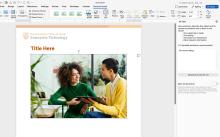
Create web pages or written content – Use proper heading structure, meaningful link text, sufficient color contrast, and alt text to provide descriptions for images.
Author documents (Word, PowerPoint, PDF) – Use built-in styles as headings, set a logical reading order, and tag PDFs. Run the Microsoft accessibility checker while creating documents to address issues before producing a PDF. If available to you, use the Adobe Acrobat accessibility on sourced PDFs.
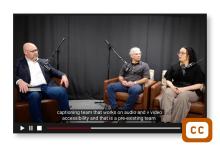
Produce video or audio – Caption every video, provide transcripts for audio, and add audio descriptions when visuals convey information not in the audio.
Create platforms, applications, or tools for University use – Build accessibility into design and development from the start. Test for accessibility throughout development and address barriers before launch.
Manage procurement or contracts – Verify accessibility before adopting a tool, and post university content only on accessible platforms. Require an accessibility review as part of every technology purchase or renewal.
Where to Get Help
Digital Accessibility Policy Information – Policy, procedures, exceptions, and FAQs.
Ally Accessibility Platform – Guidance and real-time accessibility scoring through Canvas.
Digital Accessibility Center – Visit resources, consultations, training events, and services — document, audio/video, and web accessibility support.
DAC Resource Hub – Access resources and guidance.
Email ada@austin.utexas.edu – For Institutional Accessibility and Accommodation (IAA) with questions about policies or requests for exceptions.